
NYSC Portal
How to Check and Print Out Your NYSC PPA Posting Letter
Once the orientation camp is over, every corps member will receive their NYSC PPA posting letter.
This is the document that tells you where you will be serving for the rest of your service year. It is also the letter you will need when reporting to your Place of Primary Assignment, so it is not something you collect and shove it inside your bag or throw it away.
At the final day of the orientation camp, some corps members will receive their PPA letter, while some will be told to go print it on their NYSC dashboard portal.
A lot of corps members will be confused as to why it is like that, so If you don’t receive your PPA letter in the and you don’t know where to get the letter, how to check it on your dashboard, or what to do after printing it, this post is you.
In this article, I will explain what PPA means in NYSC, what the PPA posting letter is, where you can get it, how to check and print it from your NYSC dashboard, and what to do once you have it in your hands.
What is the Meaning of PPA in NYSC?
PPA stands for Place of Primary Assignment. It is the organization, school, hospital, ministry, or company where you actually work during your one year of national service, outside of the three weeks spent at camp.
Your experience does not end in the camp. While you experience drills, parades and the stories you tell for years afterward, but your PPA is where you build actual work experience, meet people who might help grow your career later, and spend eleven straight months showing up, month after month, until your service year ends.
Once posted, you are meant to be treated as staff of that establishment, given assignments and responsibilities that match your qualifications, training, and experience, not treated as free labor or an errand runner.
What is the NYSC PPA Posting Letter?
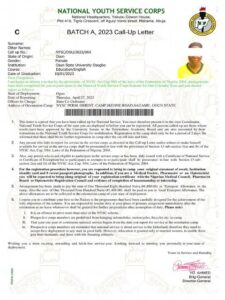
Your PPA posting letter is the official document that tells you exactly where NYSC has posted you to continue your service year after completing orientation camp. It is the formal confirmation, and it is the one document your PPA will ask to see before they accept you as their corps member for the year.
The letter will contain your name, your call up number, your state code, your date of registration, your course of study, your expected date of discharge, and along with the general policy guidelines that govern your posting.
Beyond your own details, the letter also carries guidance directed at your employer. It typically outlines that you should be given adequate job assignments matching your training, that you should either be provided modest accommodation or a reasonable allowance in place of it, and that transport to and from work should be covered or compensated with an allowance. It also states that you must be released for Community Development Service (CDS) once a week without exception.
I mention this part specifically because a lot of corps members never actually read this section of their own letter. You should read it, because if your PPA is not honoring some of these provisions, the letter itself is your proof of what they agreed to when they accepted you.
Where Do I Get My NYSC PPA Posting Letter?
Where your letter comes from depends entirely on your specific situation.
If you are a standard corps member who went through camp normally, you receive your PPA posting letter physically, in camp, on the final day. It is handed out during the closing activities, usually by your platoon officials.
If you did NYSC relocation, or had a change of PPA after camp, your letter doesn’t come to you physically at all. You’d have to print your posting letter through your NYSC dashboard portal.
How to Check and Print Your PPA Letter From Your NYSC Dashboard
If you fell into the second category I mentioned earlier, here’s how you can print your NYSC PPA letter online;
- Open your browser and go to the official NYSC portal via https://portal.nysc.org.ng
- Log in using the email address and password you registered with
- Once you are on your dashboard, look for the section labeled PPA Letter, usually visible on the left sidebar of the page
- Click on PPA Letter, and your posting letter will display on your screen
- Print it out, ideally in colour, on a clean sheet of A4 paper
What to Do if Your NYSC PPA Posting Letter Did Not Display
If nothing happens when you click, or the page seems frozen. Try refreshing the page first, or switch to a different browser altogether, sometimes, the portal behaves differently on different browsers, and if you are using a mobile, I recommend you switch to desktop mode or use a computer to check it.
If the letter still is not showing after a reasonable wait, that usually means you have not been given a PPA yet.
Only those did NYSC relocation or change of PPA can print their letter online, if you misplaced the one given to you in the orientation camp, you might need to visit your NYSC state secretariat directly and collect another one there.
What to Do After Getting Your NYSC PPA Posting Letter
After collecting or printing your NYSC PPA posting letter, the next step to take is to check you are posted to serve, it could be an organization, hospital or school, even maybe a ministry.
Report to your PPA promptly: This is the first thing to do, at least you should report to the PPA within the first 48 hours of receiving your letter, though this can be slightly different depending on your state you are traveling from, especially if you are a relocated corper. The point is not waste time on it. Show up within the week you received it, because some PPAs have a quota of corps members they needed, and once they are full, they will be rejecting any others who come after.
Present your letter to the right person: When you get to the PPA, introduce yourself properly and ask for the person in charge of accepting corps members at there. Hand over your letter, it will reviewed and decide whether to accept or reject your posting.
Collect your letter: Once your PPA decide on whether to accept or reject you, your letter will be signed and stamped.
- If accepted, make a two or three photocopies of it and give a copy to your PPA and head to the NYSC LGA office for your documentation.
- If your PPA refuses to accept you, don’t panic, this is okay, it is even common more than you know. Collect the letter, make sure it is signed and stamped with rejected boldly written on it along with the face and name of the person in charge. Report immediately to your zonal inspector or LGI, who will repost you to a new PPA or if you have a PPA in mind, will ask you to get a request from them in order to post you there.
Complete your documentation at the NYSC office: After acceptance, you will use your acceptance letter along with other documents like green card, call up letter, relocation letter (if relocated) and your result will be used to complete your documentation by your Zonal Inspector (ZI), in most LGAs, you will be attended to either by Local Government Inspector (LGI) or Corps Liaison Officer (CLO).
You will be given a documentation form to fill alongside a passport photograph, which then gets placed inside an office flat file. Once you are done, the CLO will record your details in what is commonly referred to as the book of life, and from that point, your official CDS attendance and monthly clearance cycle begins.
Sort out your accommodation: If your PPA does not provide housing, and many don’t, collaborate with your PPA to figure out accommodation as early as possible rather than assuming it will resolve itself once you arrive. Some corps members find temporary shelter at a nearby religious house or at the corps lodge if it is near to your place of work or maybe you can rent an apartment, though this depends heavily on what is available in your specific location.


-

 NYSC Senate List4 months ago
How to Check the NYSC Senate List 2026: Complete Guide
-

 NYSC Portal4 months ago
How to Do NYSC Monthly and Final Clearance for POP (2026 Guide)
-

 NYSC Call Up Letter4 months ago
How to Check Your NYSC Call Up Number on the Portal 2026
-

 NYSC Portal4 months ago
200+ NYSC POP Congratulations Messages, Prayers & Wishes
-

 NYSC Portal4 months ago
Get NERD Clearance for NYSC Mobilization in 24 Hours Here
-
JAMB4 months ago
How to Check JAMB Matriculation List for NYSC Mobilization (2026)
-
 NYSC Portal4 months ago
NYSC Portal Login Dashboard 2026 Nigeria for Batch A, B & C
-

 NYSC Camp4 months ago
After NYSC Camp: What Next? Complete PPA Guide for Corps Members