
NYSC Call Up Letter
How to Check and Print Call-Up Letter on Your NYSC Portal 2026
After completing your NYSC online registration, one of the documents you will be most eager to see is your NYSC call-up letter.
Your call-up letter is a document that tells you where you have been deployed for the NYSC orientation course, the camp you are expected to report to and the date you should report.
But there is usually a lot of confusion at this stage. Some PCMs are not sure when the call-up letter will be released. Others keep checking their dashboard and cannot find the option to print it.
If you are currently waiting for your NYSC call-up letter, this blog post will explain what you need to know and, most importantly, how to check and print your NYSC call-up letter from your NYSC dashboard portal.
What Is the NYSC Call-Up Letter?
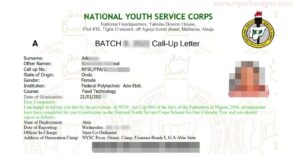
The NYSC call-up letter is the document issued to a prospective corps member after mobilisation and deployment for the NYSC orientation course.
It contains the information you need to know before travelling to camp.
The call-up letter is very important because it tells you:
- Your name
- Your NYSC call-up number
- Your state of deployment
- Your orientation camp
- The date you are expected to report
- Reporting instructions
- Other information relating to your mobilisation
This is the document you should use when making your final preparations for NYSC camp.
For example, you may have registered for NYSC in Lagos, but your call-up letter could deploy you to another state.
Who Is Eligible to Check the NYSC Call-Up Letter?
You can check and print your NYSC call-up letter if you have:
- Successfully completed your NYSC registration
- Been mobilised for the relevant batch or stream
- Been assigned a call-up number
- Been deployed for the orientation course
When Is the NYSC Call-Up Letter Released?
There is no permanent date for the release of NYSC call-up letters.
The date depends on the NYSC mobilisation timetable for your particular batch and stream. The NYSC call-up letter is usually released by the management 2 to 3 days before the orientation camp opens, rather than immediately after you finish your registration.
The important thing is to understand the sequence:
Registration → processing/mobilisation → call-up number → call-up letter
Once the call-up letter printing period begins, eligible PCMs can check their dashboards.
How to Know If Your NYSC Call-Up Letter Is Ready
If you have completed your NYSC registration and are waiting for your NYSC call-up letter, you may be wondering how to know when it is ready.
The easiest way to know is to check your NYSC dashboard. Once NYSC releases your call-up letter, a “Print Call Up Letter” option will appear on your dashboard.
This means you don’t have to wait for an SMS or email before checking. You can log in directly to the NYSC portal and confirm if your call-up letter is available.
How to Check If Your NYSC Call-Up Letter Is Ready
Follow these steps to check your NYSC call-up letter status:
- Visit the NYSC Portal using Chrome or Firefox on your phone or laptop.If you are using a smartphone, you may need to enable Desktop Site/Desktop View from your browser settings for the portal to display properly.
- Log in to your NYSC dashboard using the email address and password you used during NYSC registration.
- After logging in, scroll down to the bottom of your dashboard and look for the “Print Slip” section.
- Check for the “Print Call Up Letter” option.
- If you can see the “Print Call Up Letter” link, it means your NYSC call-up letter is available for printing.
- Click on the link and read the NYSC camp rules and regulations displayed on the page.
- Click “Accept” to continue.
- Your NYSC call-up letter will open. You can then download it as a PDF and print a copy.
What If I Cannot See the “Print Call Up Letter” Option?
If the “Print Call Up Letter” option is not showing on your NYSC dashboard, do not panic.
It usually means your call-up letter has not been released or made available on your dashboard yet.
Make sure you check the NYSC portal again after the official release date announced by NYSC. Also, confirm that you are logging into the correct dashboard and using the same account you used for your NYSC registration.
Where Can I Find My NYSC Call-Up Letter?
Your NYSC call-up letter can be accessed from your NYSC dashboard after it has been released.
You should look under the “Print Slip” section for the “Print Call Up Letter” option. Once the link appears, you can open, download and print your letter.
Why Some People Cannot See Their Call-Up Letter
This is one of the most common questions PCMs ask:
“My friend has printed their call-up letter. Why is mine not showing?”
There are several possible reasons.
1. The call-up letter has not been released yet
If the printing period has not started, there is nothing to print. Don’t stress over it simply because you cannot see the option.
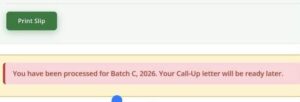
2. You have not been mobilised for that stream
Because you completed your NYSC registration does not automatically mean that you will receive a call-up letter for that particular stream.
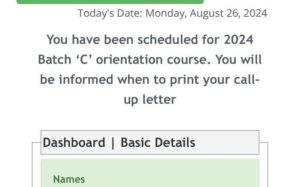
Some registered PCMs may be moved to another stream or batch.
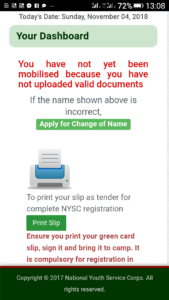
3. Your registration is still being processed
There can be additional processing before a PCM is cleared for mobilisation.
This is particularly important for foreign-trained graduates because their credentials go through an additional evaluation process before call-up numbers are issued.
4. There is an issue with your registration
Sometimes a problem with your registration, school records or other mobilisation information can affect your progress.
If the call-up letter release period has started and you still cannot access yours, check your dashboard carefully to maybe there is no error message there.
Difference Between NYSC Call-Up Letter and Green Card
Both documents are important, but they serve different purposes.
The NYSC Green Card is proof that you have successfully completed your NYSC online registration, while the NYSC Call-Up Letter contains your deployment information and tells you where you are expected to report for the NYSC orientation camp.
Here is the difference between the two.
NYSC Green Card
The NYSC Green Card is the document that serves as proof that you have successfully completed your online NYSC registration.
After completing your registration and making the required payment, you can print your Green Card from your NYSC dashboard when it becomes available.
Your Green Card contains some of the information you provided during registration, including:
- Your personal details and biodata
- Contact information
- Next of kin details
- Educational background
- Registration information
Despite its name, the NYSC Green Card is not actually green and is instead printed on plain white A4 paper.
NYSC Call-Up Letter
The NYSC Call-Up Letter is the official document that tells you where you have been deployed for the NYSC programme.
Unlike the Green Card, your call-up letter contains important information about your deployment and orientation camp.
It normally includes details such as:
- Your state of deployment
- Orientation camp address
- Date you are expected to report to camp
- Camp instructions and other relevant information
The call-up letter is very important because you will need it during your orientation camp registration.
When Will I Get My NYSC Green Card?
Your Green Card becomes available after you successfully complete your NYSC online registration and meet the requirements for printing it.
You can log in to your NYSC dashboard and check for the option to print your Green Card.
When Will I Get My NYSC Call-Up Letter?
The NYSC Call-Up Letter is released after the mobilisation and deployment process has been completed for your batch and stream.
Once it is available, you should see the “Print Call Up Letter” option on your NYSC dashboard.
You can then open the letter, download it and print a copy.
NYSC Green Card vs Call-Up Letter
The easiest way to remember the difference is this:
Green Card = Proof of NYSC registration.
Call-Up Letter = Your NYSC deployment and camp information.
So, while both documents are related to your NYSC registration, they are not the same document and one cannot be used as a replacement for the other.
What Information Is Contained in an NYSC Call-Up Letter?
Your call-up letter contains important information that you should read carefully.
Some of the major information you can expect to see includes:
1. Your Name
Check that your name is correctly displayed.
2. NYSC Call-Up Number
Your call-up number identifies you within the mobilisation process.
Keep it somewhere safe because you may need it during different stages of your service year.
3. State of Deployment
This is one of the first things most PCMs look for. It tells you the state where you have been deployed.
4. Orientation Camp
The call-up letter contains the relevant orientation camp information. Don’t make the mistake of assuming that the orientation camp is located in the state capital. Check the actual camp information on the letter.
5. Reporting Date
This tells you when you are expected to report for the orientation course. Pay attention to this date when planning your journey.
6. Reporting Instructions
Read the instructions carefully. Don’t just look at the state and close the document. Some of the most important information may be contained in the instructions section.
What Documents Should I Take Along With My NYSC Call-Up Letter?
After printing your call-up letter, your next task is to prepare your camp documents. The exact requirements can vary depending on your category and circumstances, so you should check the instructions applicable to your batch.
However, you should generally prepare your important NYSC documents well before travelling.
These may include:
- NYSC call-up letter
- NYSC Green Card
- Statement of result or certificate, as applicable
- School identity card where applicable
- Medical fitness certificate
- Passport photographs
- Other documents specified for your category
Make photocopies of important documents where required.
Don’t wait until you arrive at camp before looking for a business centre to make copies.
Documents Married Female PCMs Should Prepare
If you are a married female PCM, your documents may include additional marriage-related documents.
Keep the documents you used to support your marital status during registration available.
These may include:
- Marriage certificate
- Evidence of change of name
- Evidence of husband’s place of domicile
- Husband’s means of identification
Keep both the originals and photocopies where applicable.
Do not assume that because you uploaded a document during registration, you can leave the original at home.
Prepare properly for verification.
Documents Foreign-Trained PCMs Should Take to Camp
Foreign-trained PCMs need to be particularly careful with their documents.
If you are a foreign-trained graduate, prepare the original academic and travel documents that you uploaded during registration.
These can include:
- Degree or HND certificate
- Complete academic transcript
- O’Level certificate
- International passport
- Residence or study documentation
- Other relevant documents depending on your qualification
Foreign-trained graduates may undergo physical verification of the credentials submitted during registration, so do not travel to camp without the required originals.
If any of your documents were issued in a language other than English, make sure you have the required translation where applicable.
Should I Photocopy My NYSC Call-Up Letter?
Yes, it is a good idea to have extra copies of your important NYSC documents.
Once you have printed your call-up letter, keep the original copy safe and make additional copies where required.
You should also keep a soft copy on your phone. You may need to reprint it if you’re applying for NYSC Relocation.
What Should I Do After Printing My Call-Up Letter?
Printing the letter is not the end. In fact, this is when your real preparation for camp should begin.
1. Confirm your state
Check the state of deployment carefully.
2. Check your camp
Find out where the orientation camp is located.
3. Check your reporting date
Do not miss the reporting date because you did not read your call-up letter properly.
4. Plan your transportation
Now that you know where you are going, you can make your travel arrangements.
5. Prepare your camp documents
Arrange your originals and photocopies.
6. Get your camp essentials
Buy the things you will need before travelling.
7. Prepare your money
Set aside money for transportation, food and other personal expenses.
Can I Print My NYSC Call-Up Letter With My Phone?
Yes, you can access your NYSC dashboard using a phone if the portal and your device allow it.
However, accessing the document on your phone is different from having a physical printed copy.
If the call-up letter opens on your phone, you can save the PDF and then send it to a printer or business centre.
If you are not comfortable doing this yourself, you can take your login details and access the portal at a trusted cybercafé or business centre.
Can I Print My Call-Up Letter More Than Once?
Once you have downloaded and saved the document, you can print additional physical copies if necessary.
This is another reason I recommend saving the PDF after accessing it. Don’t depend on having only one printed copy.
Keep your documents organised and protected from water and damage.
What If There Is an Error on My Call-Up Letter?
If you notice an error, act fast and get it corrected.
First identify exactly what is wrong.
For example:
- Wrong name
- Wrong date
- Incorrect personal information
- Other information that does not match your registration details
Some corrections can be handled through the NYSC portal, while other issues may need to be reported through the appropriate channel.
Your call-up letter is an official document.
If something is wrong, report it through the proper process instead of changing the PDF manually.
Can I Change My NYSC Deployment After Printing My Call-Up Letter?
Relocation is a separate process from printing your call-up letter.
There are specific grounds and procedures for relocation, including situations involving marital or health grounds.
At the same time, don’t pay that anyone that claims they can help change your state of deployment for you
What If My Call-Up Letter Is Not Showing on the NYSC Portal?
If you log in and cannot find your call-up letter, go through this checklist:
Check 1: Has the call-up letter been released?
Look at the mobilisation timetable for your batch.
Check 2: Have you been mobilised?
Registration alone does not guarantee a call-up letter for that particular stream.
Check 3: Do you have a call-up number?
Check your dashboard.
Check 4: Did you pay for online call-up letter printing?
If you did not subscribe to the online printing option, you may need to collect the letter through your institution.
Check 5: Are you a foreign-trained graduate?
Your credentials may require additional evaluation before you are cleared for call-up.
Check 6: Is there an issue with your registration?
Check your dashboard and use the appropriate NYSC support channel if necessary.
Do not immediately create another NYSC registration because you cannot see the letter.
Find out what is actually wrong first.
Frequently Asked Questions About NYSC Call-Up Letters
How do I check my NYSC call-up letter?
Log into your NYSC dashboard through the NYSC portal and look for the call-up letter printing option. If your call-up letter has been released and you are eligible for online printing, you can open and print it from there.
How do I print my NYSC call-up letter online?
Log into your NYSC dashboard, locate the Print Call-Up Letter option, open the document, save it as a PDF if possible and print the required physical copies.
When will my NYSC call-up letter be released?
The release date depends on your batch and stream. Check the mobilisation timetable for your batch rather than relying on dates from an older batch.
Can I print my NYSC call-up letter without a call-up number?
The call-up number is part of the mobilisation process, so if you have not been mobilised or assigned a call-up number, you should not expect to have a call-up letter ready for printing.
Why can’t I see “Print Call-Up Letter” on my dashboard?
Possible reasons include the fact that call-up letters have not yet been released, you have not been mobilised for that stream, your processing is not complete, or you did not subscribe to the online printing option.
Can I collect my NYSC call-up letter from my school?
Yes, PCMs who do not subscribe to online call-up letter printing can collect their call-up letters through their institutions.
Is Green Card the same as call-up letter?
No. Your Green Card is your registration record, while your call-up letter contains your deployment and orientation reporting information.
Do I need to print my Green Card?
It is advisable to keep a physical copy of your Green Card with your other NYSC documents after it becomes available.
What should I do after printing my call-up letter?
Confirm your deployment state, camp location and reporting date. Then prepare your documents, photocopies, medical documents, camp essentials and transportation.
Can I save my NYSC call-up letter as a PDF?
Yes. If the document opens on your device, save a digital copy where possible. You should still prepare the physical copies you need for camp.
Can someone print my call-up letter for me?
Someone can assist you, but protect your NYSC login details. If you use a cybercafé, log out after printing and make sure your password is not saved on the computer.












-

 NYSC Portal4 months ago
How to Do NYSC Monthly and Final Clearance for POP (2026 Guide)
-

 NYSC Portal4 months ago
200+ NYSC POP Congratulations Messages, Prayers & Wishes
-

 NYSC Portal4 months ago
Get NERD Clearance for NYSC Mobilization in 24 Hours Here
-

 NYSC Senate List4 months ago
How to Check the NYSC Senate List 2026: Complete Guide
-
JAMB3 months ago
How to Check JAMB Matriculation List for NYSC Mobilization (2026)
-

 NYSC Call Up Letter4 months ago
How to Check Your NYSC Call Up Number on the Portal 2026
-
 NYSC Portal4 months ago
NYSC Portal Login Dashboard 2026 Nigeria for Batch A, B & C
-

 NYSC Camp3 months ago
After NYSC Camp: What Next? Complete PPA Guide for Corps Members