
NYSC Portal
How to Pay for & Print Your NYSC Relocation Letter Online (Complete 2026 Guide)
You applied for relocation, waited for NYSC to review your request, and now your dashboard finally says Approved. At first, this feels like the hard part is over.
Then you click on it to check where you are posted and realize you still cannot see your new state. Instead, NYSC is asking you to make another payment before you can print your relocation letter.
Now the questions start.
Why am I paying again? How much is the payment? Where do I make it? What exactly happens after I pay? And once I print the relocation letter, what am I supposed to do next?
This is where I see most corps members get stuck. The approval is only one part of the process. You still have to complete a few more steps before you can report to your new state and continue your service year.
Whether you applied for relocation in orientation camp or after you had already resumed at your PPA, the process from this point is the same.
In this guide, I will show you how to pay for your NYSC relocation letter, print it from your dashboard, and what to do after the letter has been issued.
What Does NYSC Relocation Mean?
Relocation, or redeployment, is the process of moving a corps member from their original state of deployment to a different state.
When NYSC first posts you, you are posted to a specific state. Most corps members stay there for the full service year. But not everyone like to stay in there for the full service, maybe you got married, due to health issues or security reasons, NYSC allows you to apply to be moved elsewhere.
Although this is not guaranteed. NYSC only approves relocation for specific, valid reasons. You cannot request a new state just because you prefer a different city or your friends were posted somewhere else. There has to be a genuine reason behind it.
Valid Reasons NYSC Accepts for Relocation
There are limited number of grounds which you can apply for NYSC relocation. If your reason doesn’t fall into one of these, your application is unlikely to be approved.
Marriage
If you are a female corps member and you got married before or during your service year, you can apply to relocate to the state where your husband lives or works. You will need your marriage certificate as proof.
Health
If you have a medical condition that cannot be properly managed in your current state of deployment, you can apply on health grounds. You will need a medical report from a recognized hospital, ideally a government hospital, confirming your condition and why your current location is unsuitable.
Security
With the current situation of the country, if there is active insecurity in your state of deployment, whether conflict, unrest, or a direct threat to corps members in that area, you can apply on security grounds. If yiy have an supporting evidence, such as verified reports of the situation, this will strengthen your case.
Director General’s Directive
Sometimes NYSC’s Director General issues directives to relocate specific corps members or groups. This is not something you request directly. If it applies to you, NYSC will notify you.
You don’t have to fabricate a reason or submit false documents to fit one of these categories. I have seen cases where corps members faced sanctions after NYSC discovered a forged medical report. It is not worth the risk.
How to Apply for NYSC Relocation
You can apply in two ways, depending on your timing.
While Still in Camp
If you already know you need to relocate before your three weeks of orientation camp end, you can apply while you are still there. Although it is done online.
Online After Camp
If you have already left camp and realize you need to relocate, you apply through the NYSC portal.
Log in at portal.nysc.org.ng using the email and password you registered with.
Scroll down on your dashboard and find the relocation option.
Select your reason and upload the required supporting document, such as your marriage certificate or medical report.
Submit and wait. NYSC reviews the request and approves or rejects it based on your documentation.
Documents You Need for Each Relocation Reason
Have these ready before you start. Missing documents are one of the biggest reasons applications get delayed.
- Marriage: Your marriage certificate, clearly showing your name and the date
- Health: A medical report from a recognized hospital, stating your condition and why your current state cannot manage it
- Security: Any available evidence of insecurity in your area, such as verified reports or official advisories
- DG Directive: No document needed from you, since this comes from NYSC itself
Scan your documents clearly before uploading. A blurry photo of your marriage certificate or medical report is one of the easiest ways to get your application delayed or rejected.
How to Check Your NYSC Relocation Status
Before making payment, you have to confirm that your relocation has been approved.
- Log in to the NYSC portal with your registered email and password.
- On your dashboard, find the relocation section.
- If your application is still under review, you will typically see “Pending.”
- Once approved, you will see an option to proceed to payment.
How to Pay for Your NYSC Relocation Letter Online
If you want to pay online, the process only takes a few minutes.
- Go to the official NYSC portal at portal.nysc.org.ng.
- Log in with the email address and password you used during registration.
- On your dashboard, scroll down to the Relocation section.
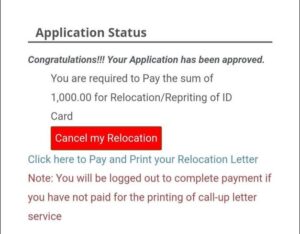
If your relocation has been approved, you will see a message asking you to make payment before you can view your new state or print your relocation letter. - Click Make Payment and choose the online payment option.
- You will be redirected to the Remita payment gateway, where you can complete the payment using your debit card.
Once the payment is successful, return to your dashboard. The option to view your new state and print your relocation letter should now be available.
If the payment does not reflect immediately, give it a little time before trying again. You can also click the Payment Status button to confirm whether Remita has already processed your transaction.
How to Pay for Your NYSC Relocation Letter Through a Bank
If you prefer not to pay online, or your card is not working, you can pay through any commercial bank.
On the Remita gateway platform, choose the bank branch option.
The portal generates a Remita Retrieval Reference number, known as an RRR.
Copy this number or print the invoice showing it.
Take the RRR to any commercial bank in Nigeria. At the counter, tell them you want to make a Remita payment and provide the RRR.
You don’t need an account with that specific bank.
Pay the amount shown, and the bank gives you a receipt.
Sometimes bank payment does not reflect immediately. If this happens, don’t panic and you don’t have to pay a second time.
At the top of the page, look for a button with “Payment Status”.
Enter your details, it could be your email or phone or the RRR number and then click on get status. This usually sorts itself out within a short time.
How to Print Your NYSC Relocation Letter After Payment
Once payment is confirmed, printing is the easy part.
Log back in and return to the relocation section on your dashboard. You should now see your new state of deployment displayed, along with an option to download or print your letter.
Click print or download. Save the file first if you are on a phone or a computer without an immediate printer connection. Print the letter, in color, become that is what they will ask for at the NYSC secretariat.
Make at least two photocopies because you might need to submit a copy there and also you will need it when you report to the local government you’re posted to. I always tell people to keep a spare copy in a separate folder from the one they carry around, in case something happens to the copy on hand.
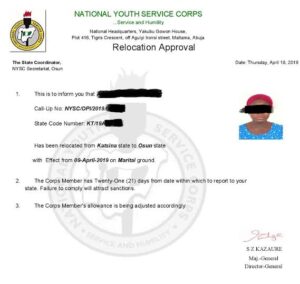
What does an NYSC relocation letter look like?
An NYSC relocation letter is an official document issued after your relocation request has been approved and the relocation fee has been paid.
The letter contains your name, state code, original state of deployment, new state of deployment, and other important details about your redeployment. You will need to print it and take it to the NYSC State Secretariat in your new state to begin your documentation.
What to Do After Printing Your Relocation Letter
After printing out your relocation letter, take it to your new state of deployment. In some cases, if you did relocation when already serving at a PPA, you may first need clearance from your original state coordinator before you are considered fully released to move. If your portal or letter mentions this, don’t skip it. Visit your original state’s secretariat and request clearance before you travel.
Once you arrive in your new state, report to the NYSC secretariat there with your relocation letter, your call-up letter, and your green card. They will do documentation for you as a corps member in that state and give you a new state code, including a new PPA.
How Long Does NYSC Relocation Approval Take?
There is no fixed number of days. It depends on your reason, how complete your documents are, and NYSC’s workload at the time.
Marriage and health cases are typically processed faster than others, since the documentation is usually straightforward to verify. Security-related and other special cases can take longer, sometimes several weeks.
Once approved, payment and printing take only minutes.
Frequently Asked Questions
How do I check my NYSC relocation status?
Log in to your NYSC dashboard using the email address and password you registered with. Scroll down to the Relocation section and check the status of your application.
If it says Pending, NYSC is still reviewing your request. If it says Approved, your relocation has been successful. At that point, you will need to pay the relocation fee before you can view your new state and print your relocation letter.
What documents do I need for NYSC relocation?
The documents depend on the reason for your relocation.
If you are applying on health grounds, you will need a medical report from a government hospital. If you are applying on marital grounds, you will need documents such as your marriage certificate, evidence of your spouse’s residence, and any other documents NYSC requests.
What are the approved reasons for NYSC relocation?
NYSC only approves relocation requests under specific circumstances.
The three major grounds are marriage, health challenges, and insecurity. When applying, you must provide documents to support your request. Meeting one of these conditions does not automatically guarantee approval, as NYSC still reviews every application before making a decision.
Why was my NYSC relocation application not successful?
If your application was not successful, it could be because the required documents were missing, unclear, or did not meet NYSC’s requirements. Sometimes, the application may also fail because of network issues or problems with the portal during submission.
Log in to your dashboard first to confirm your application status. If it was rejected, report to your PPA and continue your service in your current state unless NYSC instructs you otherwise.
How do I apply for NYSC relocation on the portal?
Log in to your NYSC dashboard and open the Relocation section. Select the reason for your application, upload the required documents, and submit your request.
If you are applying on health grounds, upload your medical report. If you are applying on marital grounds, upload your marriage documents and any other supporting documents required by NYSC.
After submitting your application, keep checking your dashboard for updates.
What does an NYSC relocation letter look like?
An NYSC relocation letter is an official document issued after your relocation request has been approved and the relocation fee has been paid.
The letter contains your name, state code, original state of deployment, new state of deployment, and other important details about your redeployment. You will need to print it and take it to the NYSC State Secretariat in your new state to begin your documentation.
How much is the NYSC relocation letter?
After your relocation is approved, NYSC charges a processing fee before you can print your relocation letter. The amount is usually around ₦1,200, although it may change if NYSC reviews its charges.
The payment is made through the Remita platform directly from your NYSC dashboard.
Can I print my relocation letter without making the payment?
No. Once your relocation has been approved, NYSC requires you to pay the processing fee before the option to print your relocation letter becomes available on your dashboard.
Final Word
Relocation feels confusing mainly because NYSC never actually explains the payment and printing part clearly. People assume something is wrong the moment the portal asks for money, when in reality it is just a required step.
Apply with the right reason, provide clean and complete documents, and once you are approved, pay and print without overthinking it. Keep your receipt and your letter safe, and report to your new state as soon as you reasonably can.
If you have questions about your own relocation process, drop them in the comments and I will answer.


-

 NYSC Portal4 months ago
How to Do NYSC Monthly and Final Clearance for POP (2026 Guide)
-

 NYSC Portal4 months ago
200+ NYSC POP Congratulations Messages, Prayers & Wishes
-

 NYSC Portal4 months ago
Get NERD Clearance for NYSC Mobilization in 24 Hours Here
-

 NYSC Senate List4 months ago
How to Check the NYSC Senate List 2026: Complete Guide
-
JAMB3 months ago
How to Check JAMB Matriculation List for NYSC Mobilization (2026)
-

 NYSC Call Up Letter4 months ago
How to Check Your NYSC Call Up Number on the Portal 2026
-
 NYSC Portal4 months ago
NYSC Portal Login Dashboard 2026 Nigeria for Batch A, B & C
-

 NYSC Camp3 months ago
After NYSC Camp: What Next? Complete PPA Guide for Corps Members